February VoteSource Newsletter
Feb 2024 · 989 words · 5 minute read
Welcome to the February edition of the VoteSource Newsletter.
Missed our last edition? Catch up by clicking here.
Or click here to browse all previous editions.

Archiving of target audiences and resetting of leaderboards
Please be aware, we will be auto archiving target audiences created up until 01/01/24 on Thursday 29/02/24.
Unfortunately we do have to archive older target audiences from time to time as not enough are marked as complete by users when they have finished with them. We also do this to encourage people to run new target audiences so that they are incorporating the latest data provided to us from local authorities.
Please be aware that no data already entered against these target audience will be lost and if you do require access to any target audience archived you can reactivate it.
To reactivate an archived target audience, you will need to have kept a note of its name. You can then go to Campaigns and select Target Audiences. From this page you can select Archived Targets. You will then be able to search by name your target audience and then select it and click Reactivate.
We will also be resetting the leaderboards for data entry and connect calling for the upcoming elections. The leaderboards will be cleared up till Friday 16th February 2024. This will allow a level playing field for everyone as we head into the election season.
Your data will not be lost though and will still be stored in the system
If you have any questions about the archiving, please call us on 020 7984 8000 or votesourcesupport@conservatives.com

Fundamentals – Mobile Canvassing
What is the VoteSource Canvasser app?
Put simply the VoteSource Canvasser app does away with having to enter data returns manually into the system. Instead, your campaigning teams enter the data into the app, and this is then uploaded directly into the system. It does require a live connection to upload the data instantly, but you can opt to use the app offline and when your device reconnects to the internet the data will then be pushed onto the system.
How do I get the VoteSource Canvasser app?
The app can be downloaded from both the Google Play store and Apple App store. Simply search for VoteSource Canvasser.
From there you can download the app like any other.
Do I need a VoteSource account to access the app?
You cannot access the Canvasser app without already having a VoteSource account. Your volunteers will need to go to www.votesource.uk and create an account which could then either be approved by yourself, if you can approve new accounts, or a campaign manager, area campaign manager or the Support Desk.
Please be aware that if you wish the Support Desk to approve the accounts, we will require an email authorising the approval to be sent to votesourcesupport@conservatives.com
What functionality can I carry out on the app?
The App can be used for canvass data entry, survey data entry and GTV Telling & Knock Up.
A common query we receive is that people assume they will be able to carry out all functionality on the Canvasser app that they can on the website. This is not the case, rather the app works in conjunction with activities enabled from the website version of VoteSource.
You would first need to run a target audience on the website and then go to the enabled activities and set up Mobile Canvassing. These activities were covered in last months Newsletter but if you didn’t have a chance to read it or require a refresher the link to the article is here:
You can set up canvassing sessions using the mobile app, these can be either through the 0 – 10 option or via the traditional VI scores depending on which canvass template you select when setting up the session.
You can also set up surveying sessions using the mobile app. This allows for you to either survey template or for you to set up a custom survey script via the surveys section. This gives you the ability to create custom local questions and ensure you are collecting the data you require locally.
And finally, the app can be used alongside your Get The Vote (GTV) operations. Not everyone who receives this newsletter will be able to create a control room, but if you have access to this, you can enable mobile canvassing from the control room to either record knocking up data or telling data on the day.
You can use the mobile app in the weeks leading up to your poll day for the Get Out the Postal Vote (GOTPV) and Get Out the Vote (GOTV) operations.
We will be covering GTV operations in later newsletters in more detail.
Should we be using Mobile Canvassing?
Yes.
The app does away with soggy bits of paper, and the effort of manually entering the data back into the system. It allows for you to accomplish more within the limited time of your campaign.
If you haven’t tried running mobile canvassing before, why not try it now?
If you have questions or need help or guidance setting up Mobile canvassing please contact the Support Desk on 020 7984 8000 or votesourcesupport@conservatives.com

Insight
Reminder! You can use these tiles to select specific groups of people to target for canvassing or writing to.
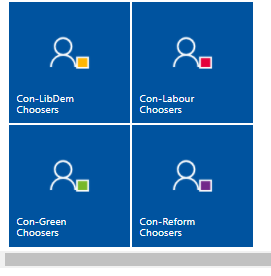
They work by combining the canvassing done in ways that can’t be done by the Advanced Target Audience builder. For instance, the Con-LibDem choosers option includes all people who are one of:
-
LKVI = M
-
LKVI = P or U who were canvassed using 0-10 and whose LibDem score is higher than Lab/Green/Reform
-
GE2019 Cs who are LibDem now
The people selected will be updated every week, on a Monday. Any questions please email insight@conservatives.com
Stat of the Month
In February so far 77,771 new voting intentions have been collected, via traditional data entry and mobile canvassing. Great work!