January VoteSource Newsletter
Jan 2026 · 2642 words · 13 minute read
Welcome to the January edition of the VoteSource Newsletter.
🎉 Happy New Year! 🎉
We are pleased to be back with some more exciting updates about the VoteSource system as we enter the new year!
Missed our last edition? Catch up by clicking here.
Or click here to browse all previous editions.
New 2026 TVA’s now available!
The VoteSource team are pleased to announce that new TVA codes have been added to the VoteSource system for 2026 to allow you to best target your constituents in the run up to your local elections.
We have been hard at work to refine these TVA codes in order to make them as effective as possible for your local campaigns, depending on the specific voters you need to target. They have been designed to allow you to reach exactly the group of voters you need every time, allowing you to fine tune your campaigns and dedicate your resources in the most effective way. After all, every election is different and audiences should be designed in response to where the electorate currently is; these new TVA codes will make this possible. We would, therefore, encourage they are widely used in your campaigns in the lead up to your local elections.
The new 2026 TVA codes in question are as follows:
Potential Conservatives 1-3.
These 3 TVA codes are designed to target individuals that possess Conservative Values and so align with us and our principles, even if they have been tempted by parties such as Reform in the past. They will, therefore, be highly winnable voters, and should be considered priorities to canvass.
Potential Conservatives 1 will have the most solid conservatives of the three options contained within it when an audience is created for this code.
Potential Conservatives 2 will contain very winnable voters, but not quite as solid as option 1.
Potential Conservatives 3 is similar to a Con-Reform chooser style audience, and would contain the least solid conservatives of the three.
Persuasion
This TVA code will select high turnout voters open to voting Conservative. They might be undecided or leaning towards an opposition party, but would be persuadable.
An audience created from this TVA won’t feature constituents who are likely to be considering reform.
Conservative Tactical Voters
This TVA code will create an audience that looks at constituents who would tactically vote for us. So, those that would choose to vote for us to prevent Reform or Labour winning an area, for example.
Currently this TVA has had anti-Reform voters loaded against it, and will include anti-Labour and ant-SNP at some point in the near future.
How to create a target audience using these new TVA codes.
So, with just how significant these new TVA codes will be for your campaigns in the lead up to this years local elections, you must be thinking: How do I use these?
Target audiences, like for many areas of VoteSource, are key to this.
To use these TVA codes to pull a list of every constituent in your area that matches the specific criteria of the code you need, you would need to select one of the ‘Advanced Target Audience’ options available from the ‘Target Audience creation screen’ found within the ‘Target Audience’ tab, in the ‘Campaigns’ section of VoteSource.
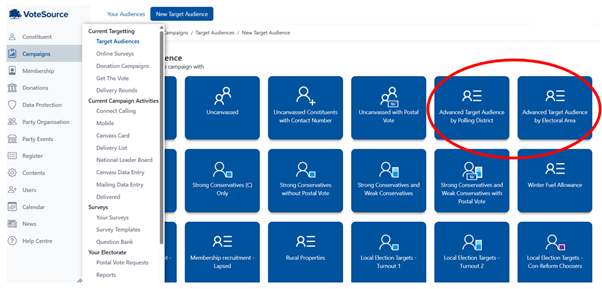
If you do not have access to the Target Audience Tab on VoteSource, and need it for your campaigning, please reach out to your association chair. or the Member Services Team (memberservices@conservatives.com) here at CCHQ, who will be able to assist you in acquiring this access.
From here, like with any audience, you would then need to select the name, franchise, and location information:
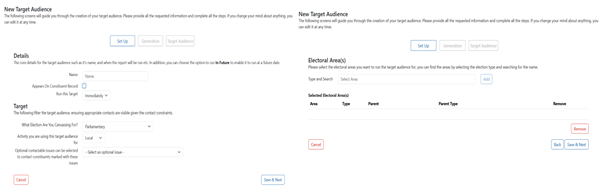
And then you will be brought to this page:
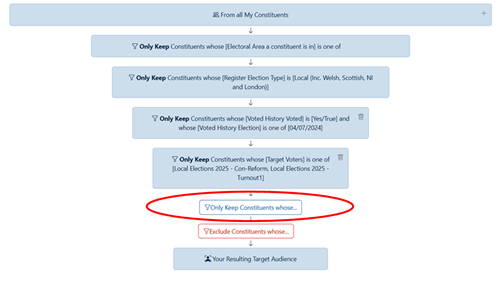
In here, from within the ‘only keep constituents whose’ box, please select the following criteria:

And then select the TVA code(s) you need for your campaign:
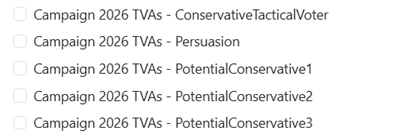
Simply generate you audience from here, and you will have an audience of every constituent in your area that matches the TVA code you need for your campaign.
It really is as simple as this, so why not use these TVA codes for your campaigns today?
And why not help us build up our data for your area to make these TVA codes as effective as possible for your campaigns? Add questions like the below to your surveys from the question bank today:
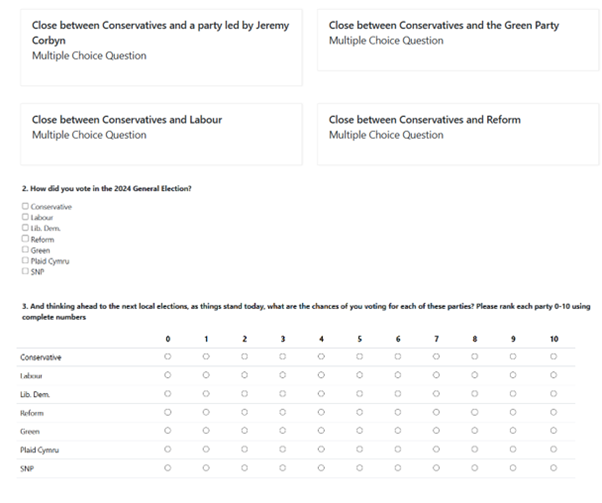
If you need any assistance in attaching these question bank questions to your surveys, please see the following guide:
Creating a calling script - Part 2 - Adding questions from the question bank -
https://votesource.uk/support/helpcenter/viewarticle/408
And, as always, should you need any assistance with anything from this article, please get in contact with the Member Services Team via email at memberservices@conservatives.com, or phone on 020 7984 8036 (Monday to Friday, 9am – 5pm).

Another Annual Rollover Success Story
With 95% of local authorities having provided us with their Annual Rollover files, and the Data team successfully uploading these onto the VoteSource system, we can say that Annual Rollover is practically completed for 2025!
Councils that are outstanding with their files will continue to be reached out to by our Data team so that we can complete this process in its entirety. But, now at the end of the first month of 2026, we are pleased to say that the vast majority of our users will now have their updated data ready for their local election campaigns.
And what a success this Annual Rollover has been!
Completed in a considerably quick time given the amount of data provided to us (Over 47,000,000 Electors, 38,000 Polling Districts, and 382,000 Electoral Geography Links have been added so far in 2025’s rollover alone!), and with a match rate of over 97% of new data matching our existing constituent data, we can only conclude that this Annual Rollover has been as incredibly successful as ever.
So, what next?
With the success of Annual Rollover in mind, it is important our users now begin to start using this new electoral data. This will dramatically improve your campaigns success’. This, for most users will centre on two areas:
- Target Audiences
- Walk Routes.
Target Audiences are a snapshot of data at the time of which they are created. Therefore, if an audience was created before Annual Rollover, it will not be using the most up-to-date data if it is continued to be used after rollover is completed. So, any target audiences created before December should now be re-run.
Some of our users may have already seen the effect of this, as audiences that were run before the rollover was completed may no longer appear on the mobile canvasser app. This is because the mobile canvasser app also uses its own up-to-date geography data, and so if the target audience from VoteSource is sending it out-of-date data it will not function correctly.
So, rerunning all older target audiences should now be considered an essential task in getting your campaigns ready with the most up-to-date data following Annual Rollover.
Walk Routes can also be similar in this regard. They are created based on electoral geography and electoral roll information that has now been updated by the Annual Rollover. This means that not all walk routes created before the rollover will match the geography now currently in use, and so either will need to be amended to match new address’/polling districts/etc., or will need to be fully created again so that they are as accurate as possible for directing your campaigns.
Some walk routes may have even been deleted due to the Annual Rollover process due to them not matching any current electoral geography (some users may have seen this when trying to create Canvass Cards by Walk Route, and the generation not proceeding). Therefore, the process of creating new walk routes for the newer electoral geography available to us is as essential as ever at this stage.
But don’t panic! We can confirm that over 135,000 Walk Routes have been maintained in some form or another from before Annual Rollover to after the Rollover process was completed. They may need some attention using your local knowledge, but your hard work has definitely not been undone!
Finally, attached below are two articles from our extensive VoteSource Help Centre which will direct you through the process of rerunning and recreating your Target Audiences and Walk Routes after the Annual Rollover, should they be of assistance to you:
Fundamentals – How to create a basic Target Audience - https://votesource.uk/support/helpcenter/viewarticle/357
Campaigning - Additional - Walk Routes - https://votesource.uk/support/helpcenter/viewarticle/268
And should you need any further assistance or have any further questions about the Annual Rollover in your area, please just get in contact with our Member Services Team (Monday to Friday, 9am – 5pm).

Why not start the year with a “spring” clean? January is a good time to check through your merges
As we move into the new year and a new campaigning cycle, data accuracy is as essential as ever to ensuring a successful campaign.
The Data team here at CCHQ go to great lengths to provide you with the most accurate and up-to-date data available to help bring about your campaigning success. We take the electoral roll data provided by local publishing authorities, upload it, and match it to our address data (which itself is Royal Mail accurate), throughout the year to ensure that this data is as accurate as possible for you.
However, it is always still possible that duplicate constituent records do exist on VoteSource.
When entering an online survey, or signing up for a new membership, constituents may use friendly names that we are unaware of; they may even misspell their names, as we all do from time to time! When this happens, the data may not be stored against the constituent record we already hold on the system for such an individual, and so a new constituent record would be created to hold this valuable data in the VoteSource system for you. This ensures that no data that is entered onto the VoteSource system is ever lost.
But, it may mean you have two constituent records for the same individual, which is not ideal for your target audiences.
This is where merging comes in.
Whilst the Data team here at CCHQ regularly runs mass merges to assist with this, local knowledge is essential to being able to merge these two constituent records together to create one complete record.
As we begin the new year, the VoteSource team would, therefore, like to encourage its users to complete any merges that they spot when using the system.
Merging Records on VoteSource:
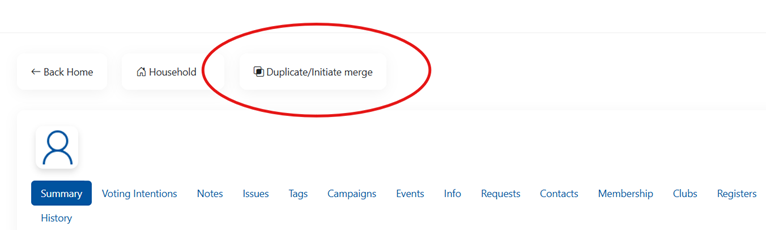
To Merge records on VoteSource you would simply need to navigate to one of the two – or more – duplicate records, and select the ‘Duplicate/Initiate merge’ option at the top of the page:
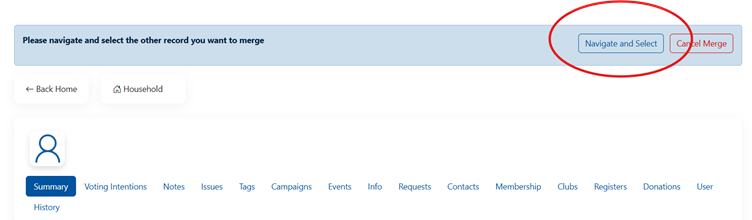
And, then, use the ‘Navigate’ option to find the duplicate constituent record, and merge this to the first record:
Once the screen below shows, the merge has begun:
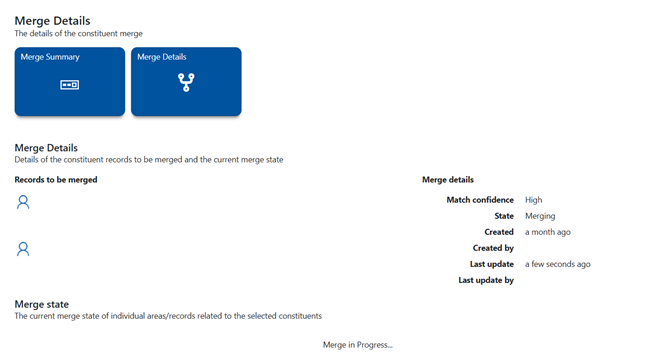
And, please remember, do not leave this page until the merge is complete. It may be that there are some merge conflicts that you will need to resolve before the merge process’, and failure to do this will result in the merge not proceeding.
Please also see this article on the VoteSource Help Centre, which will detail this process in its entirety:
How to Merge a Constituent Record that’s not matched to an electoral record to a Constituent – https://votesource.uk/support/helpcenter/viewarticle/331
By following the above advice, and the guide attached, you will be able to complete all the merges for your area, and so dramatically enhance the accuracy of the data held in your region.
And why stop there? There is always more data to “spring” clean!
Why not take a look into archiving your older Target Audiences too?
Target Audiences are a snapshot of the data at the time they are created, and so regularly archiving and replacing them is key to a good campaign. As we arrive in the new year with new data provided to us by the Annual Rollover, now is the perfect time to archive your older audiences and rerun them, as this will mean your audiences are running on the most up-to-date data possible.
To do this, please see the guide below:
Campaigning - Target Audience – Finish And Archive – https://votesource.uk/support/helpcenter/viewarticle/254
Let’s start the new year with a “spring” clean of our data to get it campaigning ready!

Campaign Academy Officer Pathways; New Opportunities for VoteSource Training for our Association Officers!
The VoteSource team would like to draw your attention to some exciting new training opportunities developed by our Campaign Academy team!
We have worked together with the Campaign Academy to help develop an extensive VoteSource training offering as part of this. And with this and the rest of the exciting training on offer in mind, we would like to strongly recommend our association officer readers participate with the new:
Campaign Academy Officer Pathway
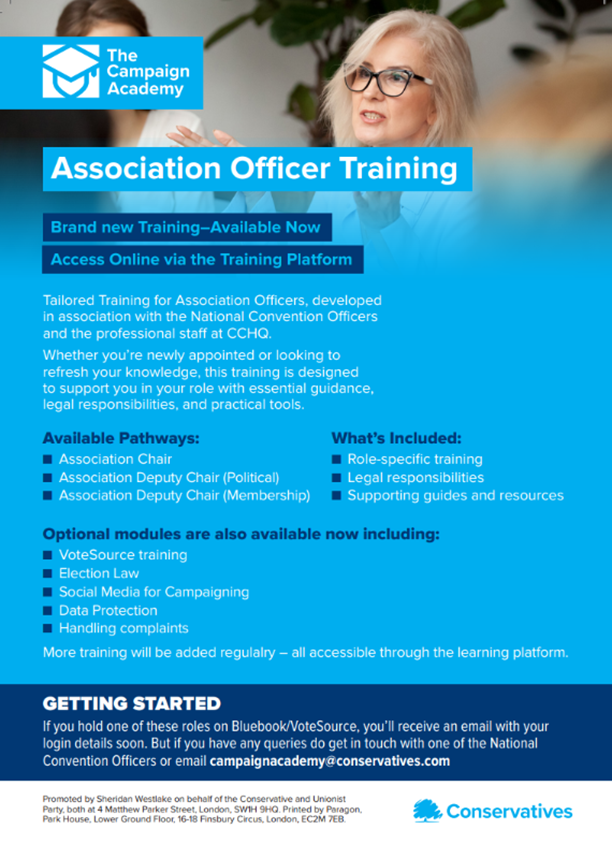
Association Chairmen, Deputy Chairmen (Political), Deputy Chairmen (Membership) and Data Protection Officers should now have access to the online Officer Training Pathways via Campaign Academy.
You should have received an email from Access Evo and the Campaign Academy explaining how to logon, but if you have not received your sign in link, or if you have any questions about the training, please email campaignacademy@conservatives.com or contact your National Convention Officers for further assistance. We strongly encourage all officers to complete this training at their earliest convenience.
The training has been developed in partnership with National Convention Officers and CCHQ staff and provides tailored guidance, resources and practical tools to support you in your role. Whether you are newly appointed or looking to refresh your knowledge, this is a valuable resource covering essential responsibilities, compliance requirements and best practice.
The Officer Pathways are designed around your role, but include guidance and resources on:
- Roles and Responsibilities – role specific guidance
- Election Law and legal responsibilities
- VoteSource and how to get the most from the system
- Campaigning fundamentals and best practice
- Digital Campaigning fundamentals and best practice
- Financial Compliance and reporting requirements
- Data Protection and GDPR obligations
- Association governance and officer responsibilities
For further information, please see the below:
The Campaign Academy are keen to receive feedback on the training and the resources available, as well as suggestions for any additional support you may find helpful. Please share your views by contacting campaignacademy@conservatives.com.

The VoteSource Canvasser App
The VoteSource team are pleased to announce that a new update has been released to the App stores for our amazing mobile app. This continues our journey to enhance the application, and so we would encourage our users to update their App today!
Please be aware that this update will not be available for our users whose devices are operating on below:
- IOS 16.1.
- Android 14.
This is because operating levels below the two above levels have stopped or are about to stop receiving vital security patches from their operating system provider.
However, rest assured that if the App is currently on your device, even if you are running your device on an operating level below that of the above, you should still be able to use the VoteSource Canvasser App at its current downloaded level.
Stats of the Month
As 2025’s Annual Rollover draws to a close, we just want to highlight the sheer amount of work done to bring you the data you need for your campaigns. You can see much of this in Article 2, but we are also pleased to confirm that our Data Team have added 1,232,240 New Electors to VoteSource in this Annual Rollover. New Electors, of course, means new voters to speak to, and we are proud that we can bring you so much new campaigning potential this year. So, why not canvass the new electors in your area today!