November VoteSource Newsletter
Nov 2025 · 2819 words · 14 minute read
Welcome to the November edition of the VoteSource Newsletter.
We are pleased to be back with some more exciting updates about the VoteSource system following the busy conference season, and as we move towards the end of the year!
Missed our last edition? Catch up by clicking here.
Or click here to browse all previous editions.

Introduction – The Annual Rollover Special Edition
As we approach the 1st of December, the upcoming Annual Rollover is on the tip of our tongues.
That is why the VoteSource team would like to highlight the upcoming Annual Rollover process that is undertaken by our Data Team here at CCHQ every year, by turning this Newsletter into an Annual Rollover Special Edition!
This Newsletter, therefore, shall feature a full explanation of the Annual Rollover, what to expect from it, and how to prepare for it, as we shine a light on what is one of the most important Data processes for VoteSource every year.

VoteSource Development Work
But, before we turn our attention to the upcoming Annual Rollover, we would just like to highlight some of the other essential work we have been carrying out on the VoteSource system over the previous month.
This has centred on two key areas, with our Developers making great work in preparation for some significant campaigning improvements to be released in the near future on to the VoteSource system. These areas are as follows:
- The first of these being an upcoming change to the VI Matrix scoring algorithm.
Groundwork has begun to update the VI Matrix scoring algorithm in order to improve the useability of the VI’s you gather from your 0-10 questions. This will affect both new VI’s you gather, and VI’s you have gathered through this method previously. This means that you will see a significant change in the VI makeup of your area once this work is complete, and one which will allow you to more effectively target your voters.
This is because this algorithm change will fine tune the VIs across your area so that they are more reflective of current voting positions, allowing you to see more clearly voters who are between two Parties (for example a Y voting intention), strongly favour a single party, or are more undecided (with multiple soft party scores being tuned to determine whether an undecided VI is more appropriate). This will mean that when you extract an audience of Ys, Ts, Ms, Hs or Zs you’ll have a larger audience of people who are choosing between two parties, and it will include all constituents we know are choosing between those parties. So, you won’t have to guess what a U or a P on a canvass card really means and can more effectively plan your conversations and squeeze your voters.
This piece of work has been developed in response to multiple requests from our candidates and activists, which we have listened to, and worked hard on this project in order to give you the best possible and most effective campaigning tools available.
This work has begun, and it will be released on to VoteSource in the near future.
Any further updates on this exciting new change to how VoteSource calculates VI’s will be communicated via the VoteSource Newsletter, VoteSource News Centre, and the Member Services Bulletin, so please keep an eye out for this. Finally, and for when this is released, should you have any concerns, quibbles, suggestions or requests for detailed VI information about your electorate, please contact Judd.Ryan@conservatives.com, who will be more than happy to assist you with this.
- The second area our Developers have been hard at work at is to create some exciting new features ready to be released on to the Online Survey section on VoteSource. This work has focussed on the following areas:
-
The creation of the ability to set Online Surveys to ‘Is Non Targeted’, which – when set – will take users straight to the survey questions when visiting an online survey, skipping the initial contact detail collection area. A feature that may be useful for surveys that wish to take a more anonymized style. There will be a new digital template available on VoteSource for use with any non-targeted surveys you create when this new feature is released.
-
The creation of the ability to host your online surveys through an iFrame on your own personal website is also being worked on to allow you to host your VoteSource online surveys wherever you need to maximise interaction and so improve their already excellent data gathering abilities.
-
A new feature to allow for redirection of the online survey to a custom thank you page after completion of the survey is also being developed. Instructions on how to set this up will be included once this is released.
-
Finally, a new Insights button is being added to the Online Survey management screen. The Insights page accessed through this will show you views, drop-offs and completion metrics for the online survey as a whole, and each question on the survey. When this is released, therefore, this will allow you to develop your online surveys to maximise interaction and so gather more essential data from your constituents.
We hope to be able to confirm these exciting new features have been released onto VoteSource soon, as these will considerably improve your ability to use online surveys through VoteSource to accurately canvass your area and so will be a valuable new tool in your campaigning arsenal.
As above, any further updates on when these exciting new features will be released onto VoteSource will be communicated via the VoteSource Newsletter, VoteSource News Centre, and the Member Services Bulletin, so please keep an eye out for this.

VoteSource Annual Rollover
With this exciting and important ongoing work on the VoteSource system in mind, let us now turn our attention to the upcoming Annual Rollover process.
What is the Annual Rollover?
The Annual Rollover is the name given to the process of adding and deleting electors, and renumbering electoral roll numbers, that is undertaken at the beginning of December every year based on the annual canvass of electors carried out in the Autumn by local publishing authorities.
During this process we are supplied data by your local publishing authority directly, which is then managed and processed by our Data Team here at CCHQ. They check for errors, correspond with the local publishing authorities, and push this data onto the live VoteSource system to make sure that you receive your updated electoral roll information as quickly as possible for your campaigns.
From year-to-year our Data Team have increasingly streamlined this process, so that the Annual Rollover is as little disruptive as possible whilst also delivering you the data you need.
Last year we even had an incredibly impressive match rate of 97.36% constituent records on the VoteSource system matching constituents provided to us by the local publishing authorities, highlighting the accuracy of our approach.
So, we really can say that our handling of this process every year goes from strength to strength, and we are confident of another successful rollover ahead!
So why are we mentioning this now?
Whilst we go to great lengths to make sure that the Annual Rollover process is as efficient and as little disruptive as possible, it is wise for our users to prepare for the rollover process accordingly.
Our users can prepare via the following 2 processes:
- Completing Merging.
- Preparing Walk Routes. This article shall cover these 2 process’ below in detail now.
Merging
What is Merging?
Merging is the process of combining two duplicate records into one complete and active record on the VoteSource system. This allows for all data we hold on this individual constituent to be kept in one place, making it both far easier to retrieve this data for campaigning purposes, and also allowing each constituent record to show a full political history of this individual.
This makes merging even more essential in the run up to and in the period following the Annual Rollover as the rollover process is a full alteration of electors in your area, so the chances of duplicate records being created is at its highest at this point.
Merging is routinely done by our Data team throughout the year, but often local knowledge is essential to be able to reach every constituent in your area. We will always need your assistance with this, therefore!
Merging should only be undertaken if you are sure that two constituent records are the same person, and never if not. Some caution should be exercised, therefore.
How should I go about this merging process?
Merging can be done in two main ways:
- Through the Constituent Record of a duplicate record.
- Through the drop-offs section on VoteSource.
The first of these two methods would be highly recommended to be undertaken throughout the year, but especially in the run up to the rollover process.
The latter, via the drop-offs section, would be best used in the time immediately proceeding after the rollover process, as this section will allow you to complete merges of all constituents who have ‘dropped off’ the current register compared to the previous register in one place.
This article shall now concern itself with detailing both processes:
- Merging through a Constituent Record of a duplicate record.
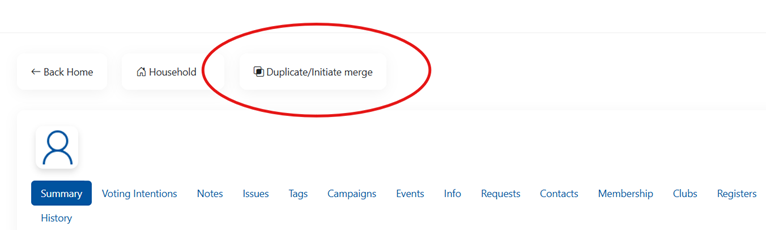
For those users with the appropriate level of access in their area, to Merge records on VoteSource you would simply need to navigate to one of the two – or more – duplicate records, and select the ‘Duplicate/Initiate merge’ option at the top of the page:
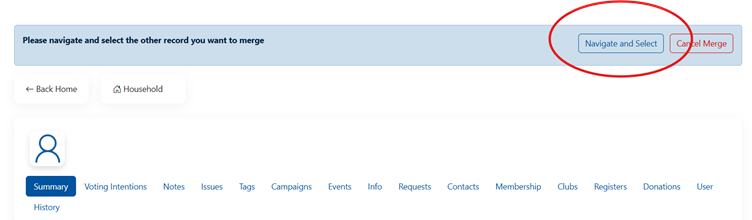
And, then, use the ‘Navigate’ option to find the duplicate constituent record, and merge this to the first record:
Once the screen below shows, the merge has begun:
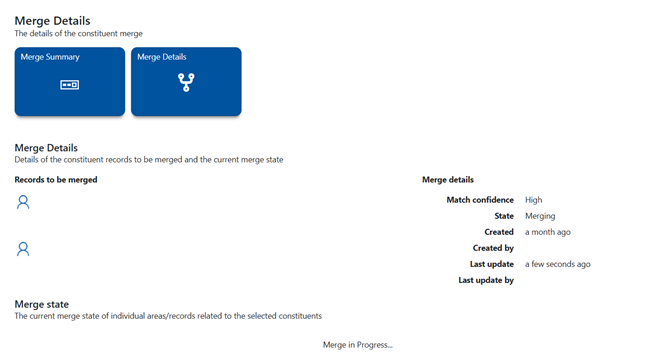
And, please remember, do not leave this page until the merge is complete. It may be that there are some merge conflicts that you will need to resolve before the merge process’, and failure to do this will result in the merge not proceeding.
Please also see this article on the VoteSource Help Centre, which will detail this process in its entirety:
How to Merge a Constituent Record that’s not matched to an electoral record to a Constituent – https://votesource.uk/support/helpcenter/viewarticle/331
By undertaking this process before the Annual Rollover process commences in December, you will be able to reduce the number of duplicate records in your association area, and so this will increase the already exceptional match rate for constituent records during the rollover. In short, this will encourage less duplicate constituent records to be created, and so this will improve the data accuracy in your area.
- Merging through the drop-offs section on VoteSource.
For merging that needs to be completed after the Annual Rollover has been completed, though, look no further than VoteSource’s dedicated Drop-off Section, which can be accessed here:
https://votesource.uk/register/Dropoffs
The Drop-Off section allows those users with the correct level of access to be able to see all of those constituents that were on a previous register but not on a current register. This will, therefore, allow you to spot any duplicate records created during the annual rollover process, and link them back to one complete record.
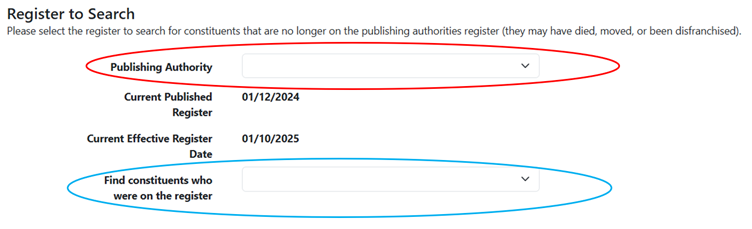
To do this, you would simply need to navigate to the Drop-Off section, and then select your council area from the drop-down menu at the top of the page, and the register you are comparing the current electoral register to in the second drop-down menu, as below:
You would then need to select how to target your drop-offs, to find the exact pool of constituents - based on the criteria you wish to target - you want to check for merges for first:
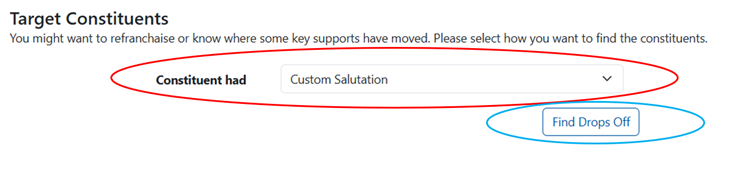
And then, click ‘Find Drop Offs’. You would then, as you see below, be able to try find a match for a constituent and start a merge by pressing this button, or mark the individual as not able to find, and move on.

This will allow you to check your current register uploaded during the annual rollover process, to ensure that no constituents ‘drop off’ the register during the annual rollover, and merge all records you find during this process together to build up a complete electoral picture for your area. This makes it an essential process for all associations to undertake after the annual rollover process is complete for your area.
For further assistance on this process please see this guide:
Drop Off – Annual Roll Over - https://votesource.uk/support/helpcenter/viewarticle/336
And finally, please remember, that the drop-offs section works by comparing a previous register to a current one, and so you will only have the time from the annual rollover register to the first monthly register (usually around 1 month) to use this section in this way. If you are running out of time to complete the drop-offs within this time frame, please see this guide for assistance on this:
Drop off – How to extract a list of Drop Offs to merge post annual rollover - https://votesource.uk/support/helpcenter/viewarticle/337
Walk Routes
Walk Routes, as many of our users will be aware, are an associations way of ordering streets within their area based on a preference for delivery in order to make campaigning sessions run more effectively for such an association. They are built completely based on local knowledge and are customised by associations to their campaigning needs.
They are, therefore, an incredibly powerful campaigning tool on the VoteSource system, and for further information on how Walk Routes work, can be used, and can be created, please see the following articles:
Campaigning - Additional - Walk Routes - https://votesource.uk/support/helpcenter/viewarticle/268
Delivery Rounds – How to create a new Delivery Round. - https://votesource.uk/support/helpcenter/viewarticle/271
Why are we mentioning this now?
However, whilst every effort is made to ensure that walk routes are maintained when the Annual Rollover process has been completed for your area, due to some changes in the electoral geography provided to us by local publishing authorities being quite considerable in certain areas, this is not something we can completely guarantee will be possible. Such changes can include polling district code changes and considerable boundary changes for such polling districts, as an example, and so areas where you are aware this may happen in your association should be paid particular attention to.
For this reason, it would be our advice to back up any essential walk routes you have before the Annual Rollover process begins, so that if there is an instance where they need to be recreated it can be done so; preparing your walk routes with the Annual Rollover in mind is key to ensuring that they are ready for the next year, therefore, so why not start now?
How should I back up my walk routes?
The best way to back up your walk routes is to navigate to the relevant walk route and then select the ‘Export to Spreadsheet’ option as shown below:
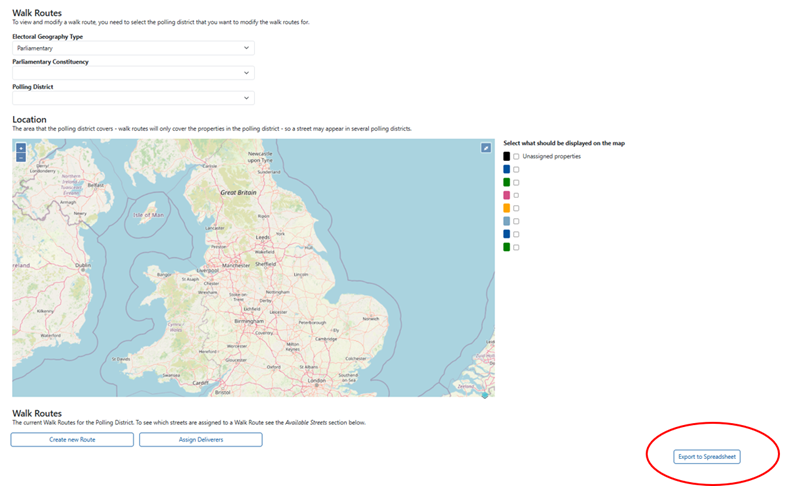
This will allow you to create a spreadsheet of every walk route in your area, by polling district, and so collate a record of your walk routes in case they need to be recreated after the Annual Rollover is complete.
In so doing, this will minimise the effect of any changes that are made to your walk routes by the rollover file provided to us by your local publishing authority, as if any walk routes are removed you will have a copy of them which you can use to simply recreate them, reducing the impact of such an instance on you and your associations resources.
Such preparation will allow you to spend less time concerned about this eventuality, and so we would highly recommend this step is taken before the Annual Rollover commences on the 1st of December.
And don’t worry, our Data team here at CCHQ will always ensure as much as possible is done to make sure that no walk routes are removed during the annual rollover process.
How will we assist you through the Annual Rollover Process?
As always, our Member Services Team will be available for any queries or questions you may have during the Annual Rollover Process. We can be reached via email at memberservices@conservatives.com, or you can give us a call on 020 7984 8036 (Monday to Friday, 9am – 5pm), and we will be more than happy to help!
As with previous years, we will also be running a News Article on the VoteSource News Section, where we will update all of our users with the progress of the rollover process this year. This will be updated daily to inform you of which council areas have and have not yet been completed, so please keep an eye out for this.
This will be found here, from the beginning of December: https://votesource.uk/support/news/newsarea
And, if you have any questions or concerns as we approach the Annual Rollover Process, once again, please just let our Member Services Team know, and we will be able to assist you.