September VoteSource Newsletter
Sep 2025 · 2348 words · 12 minute read
Welcome to the September edition of the VoteSource Newsletter.
We are pleased to be back with some more exciting updates about the VoteSource system now the busy summer months are coming to a close!
Missed our last edition? Catch up by clicking here.
Or click here to browse all previous editions.

Summer Releases; a Busy Summer here at the VoteSource Team
Summer is a time to unwind, and for many take a well-deserved break. But here at the VoteSource Team we have been hard at work to deliver some fundamental improvements to the VoteSource system, in order to enhance the experience of all of our users.
Therefore, we are pleased to announce that the following new features and improvements have been released this summer onto VoteSource:
- Control room activities have been improved, fixing an issue where duplicates could appear when householding mail merge files. The performance of generating these files has also been fine tuned to give you files to mail merge quicker than ever before.
- The map tiles present on Canvass Cards and Delivery Lists have been updated to include new estates and roads. Over 15,000 of these map tiles have received this update to allow you to canvass your address’ even more accurately going forward.
- Minor changes to the Constituent Campaign page have been made to enable more accurate dates and times from Survey responses collected to be displayed.
- Improvements have been made to the Mobile syncing on the VoteSource Canvasser App to streamline this process.
- Major improvements to the survey engine have been made, to make it easier for you to create your surveys for your own specific campaigning needs.
- A variety of Campaigning Releases and Hotfixes have also been made to improve the overall experience of our users on the campaigning sections of VoteSource.
We can also confirm that two new incredibly significant features have been developed for campaigning on VoteSource too this summer, which we are pleased to highlight in more detail below:
Count Only Audiences
One of the key additions made to the system this summer is the ability to now generate a count-only Target Audience.
From monitoring the system, we noticed that many of our users needed their audiences to produce just a number of constituents pertaining to a certain criterion, and didn’t always need every campaigning function to be enabled for these audiences when this was the case. We have listened, and have developed the count only audience feature to account for this, and provide more flexibility for your campaigns.
This function is up to 50% faster at getting you the number of people, addresses, and emails that could be included for a specific criterion, and doesn’t require you to create a full target audience when all you need is this number.
Creating these counts couldn’t be easier, either!
A new action has been added to the target audience generation screen that allows you to select a traditional style target audience, or a count-only audience, as the image below demonstrates:
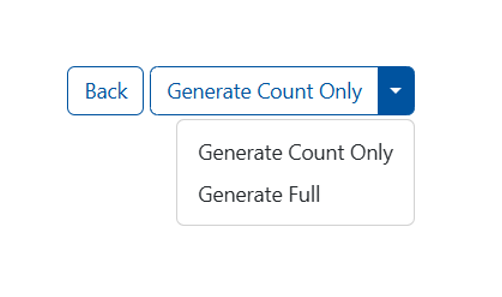
This new feature will add to your VoteSource campaigning arsenal and will allow your campaigns to be more flexible and intuitive; we hope you enjoy using this new feature!
Issue Specific Consent
The VoteSource team have developed a new feature which will dramatically change the way that VoteSource operates with regards to recording contact consent.
Going forward, we can confirm that contact consent can now be stored relating to specific issues and not just for full marketing consent. This dramatically improves the ability of VoteSource to store emails, and will likely increase the number of contacts we hold for your constituents, allowing you to reach out to your area more completely in your campaigns. This will also allow specific, petition-related, surveys to be set up through VoteSource and enabled as online surveys for your issue-specific campaigns; something, I’m sure, our Councillor users will find particularly useful.
Future releases will be targeted to enhance the contacting of these sub issues over the coming months.
In the meantime, should you need any assistance with creating surveys to gather emails and contacts, please see the following guides from the VoteSource Help Centre:
How to add a survey - How to create a Survey section 1 - https://votesource.uk/support/helpcenter/viewarticle/244
Surveys- Part 2 Adding Questions & Answers - https://votesource.uk/support/helpcenter/viewarticle/245
Survey - Section 2B - Explanation of question types for answers - https://votesource.uk/support/helpcenter/viewarticle/384
Campaigns - Online Survey - https://votesource.uk/support/helpcenter/viewarticle/385
If you have any questions about these new features and improvements, please just let our Member Services team know, and they would be more than happy to advise.
We hope you enjoy using these new features as part of your campaigns!

New Options for your Proposed Electoral Boundaries
Along with the exciting improvements above, we are also pleased to announce that the Data team have been working hard to bring about a new capability to the VoteSource System; this being a new way for us to help our users by managing Proposed or Future electoral boundaries on VoteSource.
Previously, it had been the case that we would have to wait for new boundaries to come into effect and to be informed of such by the council before we were able to upload these onto VoteSource. Often this led to more administrative work for our campaigning teams in the field in order to campaign using the boundaries that they knew were coming into effect soon, but were not present on VoteSource.
We understand the difficulties of this, and we have worked hard to introduce new capacities to VoteSource to assist our users with this.
This is why we are now pleased to confirm that we are able to assist by processing proposed boundaries and adding them on to the VoteSource system so that you can use them for your campaigns.
In order for us to do this for you, all we will need you to do is the following:
- Wait for the Boundary Review to complete.
- When this has concluded, locate the Boundary Review in question on the LGBCE website (https://www.lgbce.org.uk/).
- Send a link to this, and your request for these boundaries to be inputted onto VoteSource, to your local field team/campaign manager. They will need to be sent to your local field team/campaign manager in order to begin the process.
Your local field team/campaign manager will then be able to prioritise requests as needed for local campaigns and send them to us in this fashion for upload.
Proposed/future boundaries have already been added for the Welsh Senedd Elections in 2026, and are available to use in your target audiences should you have access to these areas, so why not see if your proposed or future electoral boundaries can be added onto VoteSource for you today?
We hope you will find this new development a great advancement in how VoteSource works for you!

Monitoring your User Base’s VoteSource Access
As summer draws to a close, the VoteSource team would like to remind all officers who are responsible for managing the VoteSource user base of their association/federation area that it is an essential practice to routinely monitor the access of their users.
This is particularly important at this time of year, as association officers have often changed over the summer months and so updates become more important to ensure that no user who shouldn’t have access to VoteSource for your area does so, and equally that the new association executive is all set up and ready to go. This should all be seen as a key part of your association’s/federation’s good governance.
As a team we are often asked as to how best to view a list of all users in an association/federation area to facilitate this, and so we thought it pertinent to highlight the ‘Roles’ section of VoteSource for this purpose.
For those users who have access to manage the user base of their association/federation, from within the ‘Users Tab’ there is a section entitled ‘Roles’:
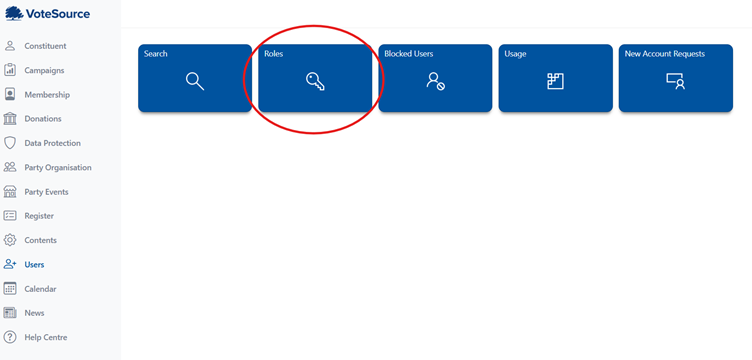
From within here you are able to search for users with specific roles across your area, or to search for just your area (without selecting a role) and see a whole list of users in your area. By doing this, therefore, you will be able to monitor and manage all access across your association, and we would so advise you to use this section regularly to assist with this.
If you need any assistance with this, please just let our Member Services team know.
And if you need any assistance in deciding what role is appropriate for a certain user, please see the below guide which focuses on the local roles available and their access abilities:
List of roles a Constituency Organiser can grant - https://votesource.uk/support/helpcenter/viewarticle/151

Annual Rollover Preparation – A Reminder
As we approach the end of the year, the VoteSource team would like to remind our users of the upcoming Annual Electoral Register Rollover, which begins on the 1st of December. This reflects the annual canvass of electors carried out in the Autumn every year by local publishing authorities. In addition to adding and deleting electors, it reorders the Electoral Roll number of your constituents.
All of this helps prepare your data for the upcoming year and all of your future canvassing sessions.
So why are we mentioning this now?
Whilst we go to great lengths to make sure that the Annual Rollover process is as efficient and as little disruptive as possible, there are certain areas of VoteSource that this process can affect more than others, and it is wise for our users to be aware of these and prepare accordingly:
Merging
Whilst our match rates are exceptional when it comes to adding new register data onto VoteSource, it is still possible for multiple constituent records to be created on VoteSource at this time. This means that valuable data gathered against the constituent may be split over multiple records; this hampers your ability to build up a complete political history of the individual for your campaigns, which in turn can reduce your campaign’s impact. And, as the Annual Rollover process is a full alteration of electors in your area, the chances of duplicate records is at its highest at this point. Preparing your records to minimise this is essential, therefore.
This is where Merging comes in.
For those users with the appropriate level of access in their area, merging is an option that allows for our users to combine constituent records into one complete constituent record. Undertaking this process routinely throughout the year is strongly advised, but this process becomes even more important in the run up to the Annual Rollover, as we have already discussed, and in its immediate aftermath too. This is why we are bringing this to your attention now.
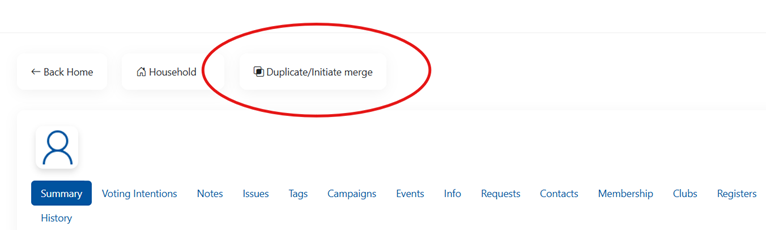
To Merge records on VoteSource you would simply need to navigate to one of the two – or more – duplicate records, and select the ‘Duplicate/Initiate merge’ option at the top of the page:
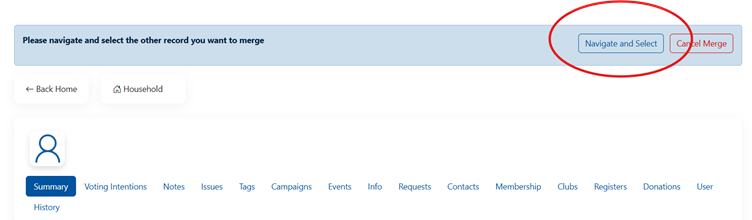
And, then, use the ‘Navigate’ option to find the duplicate constituent record, and merge this to the first record:
Once the screen below shows, the merge has begun:
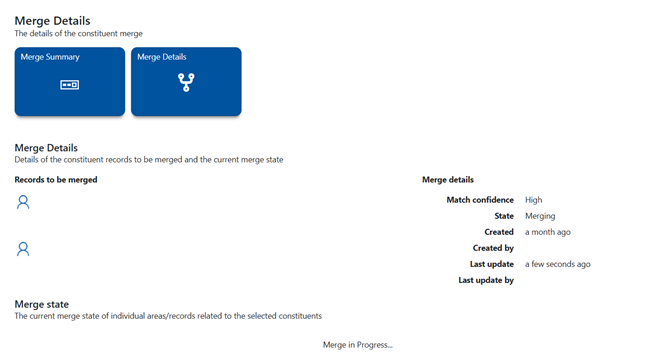
And, please remember, do not leave this page until the merge is complete. It may be that there are some merge conflicts that you will need to resolve before the merge processes, and failure to do this will result in the merge not proceeding.
Please also see this article on the VoteSource Help Centre, which will detail this process in its entirety:
How to Merge a Constituent Record that’s not matched to an electoral record to a Constituent – https://votesource.uk/support/helpcenter/viewarticle/331
Using local knowledge, therefore, our users will be able to spot split records and merge them together to improve the – already excellent – accuracy of the data held locally for its constituents. As we know, data quality is vital to a successful campaign, and so this is a key job for all associations at this time.
Walk Routes
Whilst every effort is made to ensure that walk routes are maintained when the Annual Rollover process has been completed for your area, due to some changes in electoral geography being quite considerable in certain areas, this is not something we can completely guarantee will be possible.
For this reason, it would be our advice to back up any essential walk routes you have before the Annual Rollover process begins, so that if there is an instance where they need to be recreated it can be done so; preparing your walk routes with the Annual Rollover in mind is key to ensuring that they are ready for the next year, therefore, so why not start now?
The best way to back up your walk routes is to navigate to the relevant walk route and then select the ‘Export to Spreadsheet’ option as shown below:
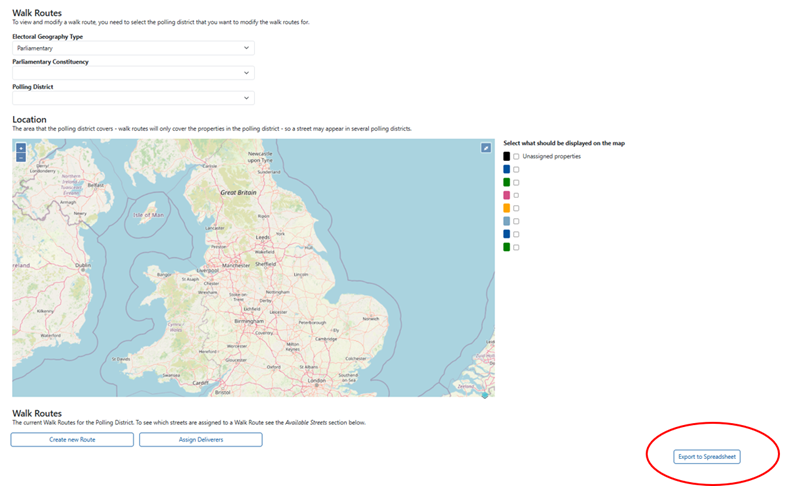
This will allow you to create a spreadsheet of every walk route in your area, by polling district, and so collate a record of your walk routes in case they need to be recreated after the Annual Rollover is complete. In so doing, this will minimise the effect of any changes that are made to your walk routes by the rollover file provided to us by your local publishing authority.
With these steps taken, we will see the Annual Rollover process go ahead successfully, updating your data for the new canvassing year, and helping you reach all of your constituents easily and effectively.
We hope to bring you further updates as we move towards the commencement of the Annual Rollover process.
Stats of the Summer
Through the summer months the Data team have also been working hard to improve the address’ available to you for your campaigns. With this in mind, we can also confirm that over 23,000 address’ have been updated to improve their accuracy; this you will find will bring particular improvements to campaigns occurring in high density areas with a large number of flats/high rises. And in line with this 79,003 Constituent Electoral Register address’ have also been cleansed to further improve the data available to you for your campaigns.
Why not make use of this data today!